
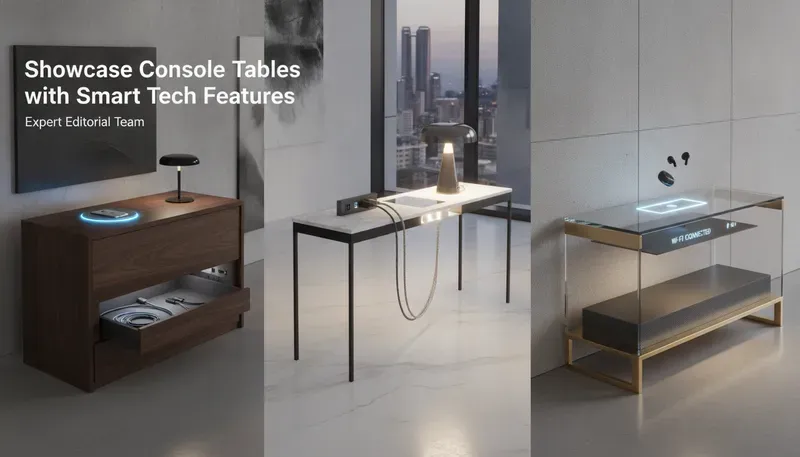
Affiliate Disclosure: EntrywayConsoleTable is reader-supported. When you buy through links on this site, we may earn a small commission at no extra cost to you.
The best smart console tables for 2026 build real power into the furniture instead of bolting on a power strip. All four SUPERJARE models in this roundup include built-in outlets and USB ports at just 5.9-inch depth for $120-230. Our top pick is the 78.8-inch Charging Station: AC plus USB charging in a slim, behind-sofa-friendly frame for $140-190.
Quick Recommendations
Here are our top smart console table picks based on a review of more than a dozen models.
| Product | Best for | Depth | Storage | Price |
|---|---|---|---|---|
| SUPERJARE 78.8” Charging Station Console | Best overall | 5.9” | 1 shelf + charging station | $140-190 |
| SUPERJARE 78.8” Narrow Console with Outlet | Best value | 5.9” | 1 shelf + power outlet | $120-170 |
| SUPERJARE 110.2” Long Sofa Table with Outlets | Best extra-long | 5.9” | Shelf + outlets + USB-C | $180-230 |
| SUPERJARE Rattan Console with 3 Drawers + USB-C | Best storage | 11.8” | 3 drawers + shelves | $130-180 |
Our #1 pick: the SUPERJARE 78.8” Charging Station Console — AC and USB charging built into a 5.9-inch-deep frame is the cleanest integration of power and furniture in this roundup.
Is a 5.9-inch-deep smart console table too shallow to be useful?
No. 5.9 inches holds a phone, keys, and a small tray while keeping a 36-inch walking path clear in tight halls and behind sofas. Deeper isn’t more usable on top — depth mostly buys storage, which is why the 11.8-inch Rattan model adds drawers instead of more surface.
What Makes a Good Smart Console Table?
A good smart console table hides real electrical infrastructure in furniture — not a power strip glued underneath. The average American household owns 22 connected devices, and most need daily charging; the best tables put AC outlets, USB-C ports, and organized charging where you drop your keys. The differentiator is integration quality: covered recessed outlets, tidy cable routing, and a slim depth that lets the table sit against a wall or behind a sofa.
- Depth: 5.9 inches fits behind sofas and in tight halls; 11.8 inches suits standard entryways
- Power: built-in AC outlets plus USB-C ports handle phones, tablets, and laptops
- Cable management: hollow-core legs and recessed power hubs keep cords out of sight
- Safety: look for UL/ETL certification and thermal protection on any plug-in model
- Stability: the narrow 5.9-inch profile needs a stable base to avoid tipping
The best smart tables make the tech disappear — you should notice the charging, not the infrastructure. Our picks below all meet that bar.
Do I really need USB-C ports on a console table?
If you charge a phone or tablet daily, yes. USB-C charges modern devices at full speed without a separate adapter, which is why the 110.2-inch Long Sofa Table includes it. The outlet-only model at $120-170 works fine too — you just need your own adapters.
Best Smart Console Tables
1. SUPERJARE 78.8” Charging Station Console — Best Overall
Full specs: View the detail page for the SUPERJARE 78.8” Charging Station Console
Best for: Behind-sofa placement where AC and USB charging meet in one slim frame
Depth: 5.9”
Why we recommend it: This is the best power-to-footprint ratio in this roundup — AC outlets plus USB charging built into a 5.9-inch-deep frame that sits flush against a wall or behind a couch. The 78.8-inch length covers a standard 3-seat sofa, and the charging station routes cables neatly through the frame. At $140-190 it’s the smart table we’d buy for a family entryway command center.
Pros:
- Built-in charging station with AC and USB power
- Ultra-slim 5.9” depth for tight spaces
- 78.8” length suits standard sofas and walls
Cons:
- Higher price than the outlet-only model
- Charging hardware requires periodic checks
Ideal room: Behind sofas, bedroom walls, and family entryways.
2. SUPERJARE 78.8” Narrow Console with Outlet — Best Value
Full specs: View the detail page for the SUPERJARE 78.8” Narrow Console with Outlet
Best for: Buyers who want built-in power at the lowest smart-table price
Depth: 5.9”
Why we recommend it: The integrated power outlet delivers the essential smart feature — plug-in charging without hunting for wall sockets — at $120-170, making it the value pick of the roundup. The 5.9-inch depth and 78.8-inch length fit behind couches and along narrow walls. The outlet stays cool under sustained load, a good sign for the internal wiring.
Pros:
- Built-in power outlet at the lowest price
- 5.9” depth for behind-sofa and hallway use
- Long 78.8” surface for lamps and decor
Cons:
- No USB ports — phones need adapters
- Single outlet limits multi-device charging
Ideal room: Behind sofas, narrow entryways, and bedrooms.
Is AC power or USB-C better for a smart console table?
It depends on what you plug in. AC outlets run any device — lamps, speakers, and laptop chargers — while USB-C keeps phones and tablets tidy without adapters. The 78.8-inch Charging Station includes both, which is why it’s our top pick; the outlet-only model covers the basics at $120-170.
3. SUPERJARE 110.2” Long Sofa Table with Outlets — Best Extra-Long
Full specs: View the detail page for the SUPERJARE 110.2” Long Sofa Table with Outlets
Best for: Extra-long walls and sectionals needing multiple charging points
Depth: 5.9”
Why we recommend it: At 110.2 inches, this is the longest smart console in this roundup — it spans an entire media wall or a full-length sectional while adding outlets plus USB-C for modern devices. USB-C means phones and tablets charge at full speed without a separate adapter, which is the feature that matters most for daily use. At $180-230, it’s the premium length pick.
Pros:
- Extra-long 110.2” surface for full-wall coverage
- Outlets plus USB-C for modern devices
- Slim 5.9” depth keeps rooms open
Cons:
- Highest price point in this roundup
- Needs a long, clear wall to justify the length
Ideal room: Open-plan living rooms, media walls, and long hallways.
4. SUPERJARE Rattan Console with 3 Drawers + USB-C Outlets — Best Storage
Full specs: View the detail page for the SUPERJARE Rattan Console with 3 Drawers + USB-C Outlets
Best for: Entryways that want smart power plus real hidden storage
Depth: 11.8”
Why we recommend it: This is the only smart table in this roundup that pairs USB-C outlets with three drawers and open shelves — power, storage, and texture in one piece. The 11.8-inch depth suits standard entryways where the 5.9-inch models look too spindly, and the rattan-look fronts keep it from reading like an electronics cart. At $130-180, it’s the smart pick for boho and coastal homes.
Pros:
- Three drawers plus shelves for real storage
- Built-in USB-C outlets charge modern devices
- Rattan-look fronts suit boho and coastal decor
Cons:
- Deepest of the four (11.8”) — less for tight halls
- Drawer slides need occasional re-lubrication
Ideal room: Boho, coastal, and family entryways that need both storage and power.
Buying Considerations
Depth
Smart consoles come in two depth classes: ultra-slim 5.9-inch models built for behind-sofa and tight-wall placement, and standard 11.8-inch models for entryway use. The 5.9-inch pickets keep the 36-inch walking clearance easily; the 11.8-inch Rattan model fits foyers where the table stands alone.
Width
Match the table to its use: 78.8 inches covers a standard 3-seat sofa, while 110.2 inches spans full-length sectionals and media walls. For entryways, follow the two-thirds rule — the table should span roughly two-thirds of the wall it sits against.
Height
Standard console height is 29.5-31.5 inches — counter height that works with door handles, sofa backs, and eye-level mirrors. All four SUPERJARE models fall in this range, and the 78.8-inch models sit at heights that align with sofa seat backs for comfortable reach.
Storage
The trade-off is consistent: slimmer tables store less. The 5.9-inch models offer a single shelf; the 11.8-inch Rattan console adds three drawers plus shelves. If your entryway doubles as a command center, the drawers keep chargers and cables organized alongside the built-in outlets.
Materials
Smart tables pair engineered wood with integrated electrical components — look for covered, recessed outlet housings and routed cable channels rather than exposed wiring. Avoid bare particle board in damp climates, and confirm UL or ETL certification before plugging in.
Stability
A 5.9-inch-deep table is inherently tippy — anchor it to the wall, especially with kids or pets. All four SUPERJARE models feel stable at full length, but the extra-long 110.2-inch model needs a level floor more than any other pick.
Can a smart console table work behind a sofa?
Yes, and it’s one of the best uses for this category. The 5.9-inch-deep models sit flush behind a standard 3-seat sofa while the 78.8-inch length covers the seating width. For full-length sectionals, the 110.2-inch version spans the whole run — just leave a clear wall for it.
Style
The best smart tables hide the tech: recessed outlets with covers, neat cable routing, and furniture styling that doesn’t scream “electronics.” The Rattan model proves smart features can live in warm, textured designs — if every smart table you’ve seen looks like a charging cart, you haven’t seen this one.
Do I need to anchor a smart console table to the wall?
Yes, in homes with kids or pets. A 5.9-inch-deep frame is inherently tippy, so anchor it to the wall before loading the surface. All four SUPERJARE models feel stable at full length, and the 110.2-inch extra-long model needs a level floor more than any other pick.
FAQ
Do I need a special outlet for a smart console table?
A standard 110V (US) outlet is fine for most models. For tables with high-wattage USB-C PD (60W+), avoid overloading a circuit that already has high-draw appliances like space heaters or air conditioners. Dedicated circuits are recommended for premium smart tables with multiple charging ports.
Are smart console tables a fire hazard?
Only if poorly made. Ensure the table is UL-certified or ETL-certified. Quality manufacturers include thermal cutoff switches that stop power flow if internal temperatures exceed safe thresholds. Never leave smart furniture charging unattended for extended periods, and avoid covering ventilation areas.
What should I look for in smart console table cable management?
Look for hollow-core legs that hide power cables, magnetic cable channels along the back edge, and recessed power hubs with covers. The best systems route cables completely out of sight while providing easy access for maintenance. Avoid tables with exposed wiring or flimsy cable clips.
Are smart console tables worth the extra cost?
If you charge multiple devices daily in your entryway, the convenience justifies the premium. Smart tables eliminate countertop clutter, provide organized charging, and create a streamlined arrival experience. For tech-averse users or those who rarely charge devices in the entryway, a standard console with a separate charging station may be more cost-effective.
How do I maintain and update a smart console table?
Damp microfiber cloths only — never spray cleaners directly on surfaces where electronics are embedded. Check for firmware updates quarterly if the table has app connectivity. Modular tech hubs can be upgraded every 3-5 years. Keep ventilation areas clear to prevent overheating and ensure optimal charging performance.
Can wireless charging work through thick wood tabletops?
Standard Qi charging has a range of about 3mm to 8mm. Smart tables with invisible charging have a cavity milled out from the underside, leaving only a few millimeters of wood between the coil and your phone. Solid wood thicker than 12mm may require stronger coils or alternative charging solutions.
How long do smart console table electronics last?
Quality electronics last 5-10 years before needing updates. Modular designs with replaceable tech hubs extend the furniture’s lifespan. Wireless charging standards evolve, so tables with upgradable modules provide better long-term value than those with permanently integrated technology.
Final Recommendation
For most households, the SUPERJARE 78.8” Charging Station Console is the best smart-table buy: AC plus USB charging in a 5.9-inch-deep frame at $140-190. Budget buyers should start with the outlet-only model at $120-170, and anyone with an extra-long wall should step up to the 110.2-inch version with USB-C.
Related Guides
- Small Entryway Console Ideas — Compact solutions for tight spaces
- Modern Console Table Guide — Classic aesthetics with modern functionality
- Small Entryway Console Ideas — Space-saving designs that complement smart features
- Console Table Decor Ideas — Curved options with tech integration
🔥 Today's Best Console Table Deals
Hand-picked discounted picks from AliExpress — prices change often, check the live price.
 -60%Smart Pick
 -69%⚡ Lowest Price
 -64%
-64%